

How to use the Spot Healing Brush tool
The Spot Healing Brush removes small spots, dust and blemishes. Paint over the mark and it is filled from the texture around it, blended to match.
Where to find it
It is in the toolbar, in one slot with Remove, Healing Brush, Patch, Content-Aware Move and Red Eye. Right-click the slot, or press and hold it, to choose between them. Press J to pick it, and Shift+J to step through the other tools on that key.
How to use it
- Choose the tool. Press J, or click the plaster in the toolbar.
- Size the brush. Set Size a little larger than the mark.
- Paint over the mark. Click on a dot, or drag along a scratch or a stray wire.
- Let go. It heals when you release. Press Ctrl+Z (Cmd+Z on a Mac) if the result picked up the wrong texture, and try a smaller stroke.
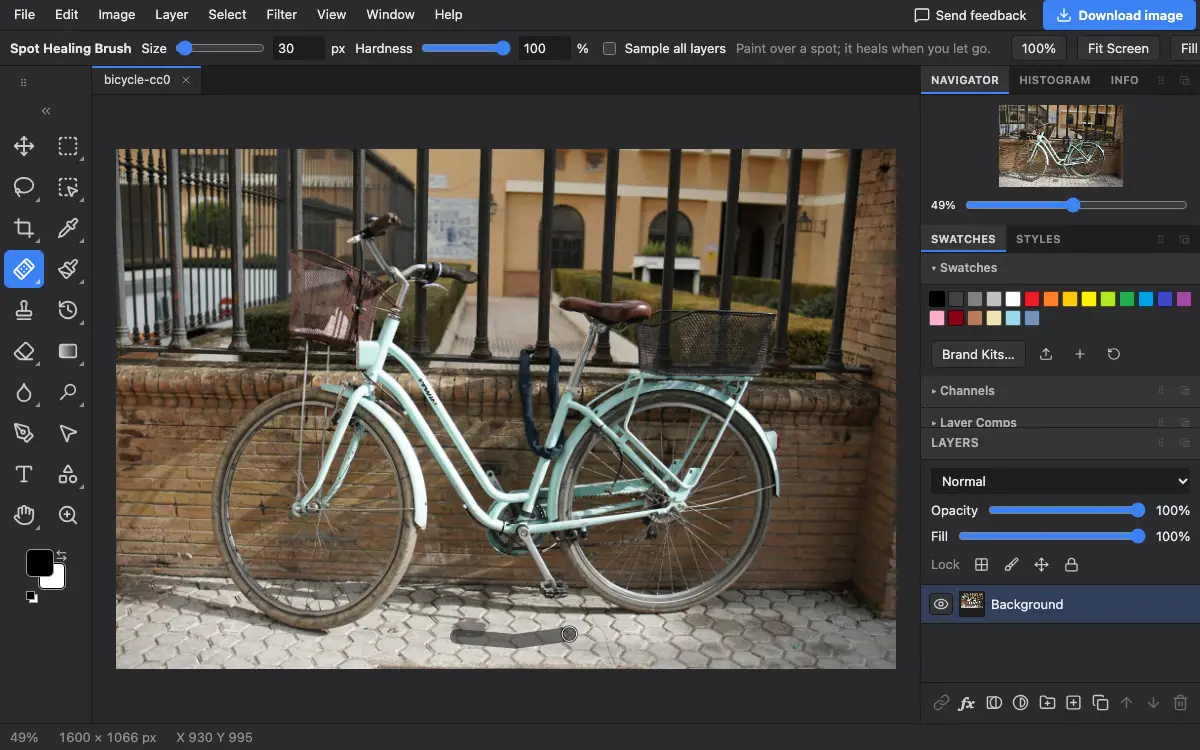
Options bar settings
Tips and common mistakes
- Work in short strokes. One long stroke across different textures gives a smeared result.
- For something larger than a spot, the Remove tool is usually better.
Related
Photostar is a free online Photoshop alternative that runs in your browser. There is no account to make, and your files stay on your device.
Checked in the current editor.