

Convert camera RAW photos to JPG
Camera RAW files hold everything the sensor saw, but you cannot post or send them as they are. Photostar develops RAW files in your browser and saves them as JPG or PNG, without sending them to a server.
Photostar is a free online Photoshop alternative that runs in your browser. There is no account to make, and your files stay on your device.
Open a RAW photoOpens the free editor. Nothing is uploaded.How to do it
- Open the RAW file. Use the button above or drop the file onto Photostar. It is developed on your device, which can take a few seconds for a large file.
- Adjust if you want. Choose Filter → Camera Raw Filter to change exposure, white balance, shadows and highlights.
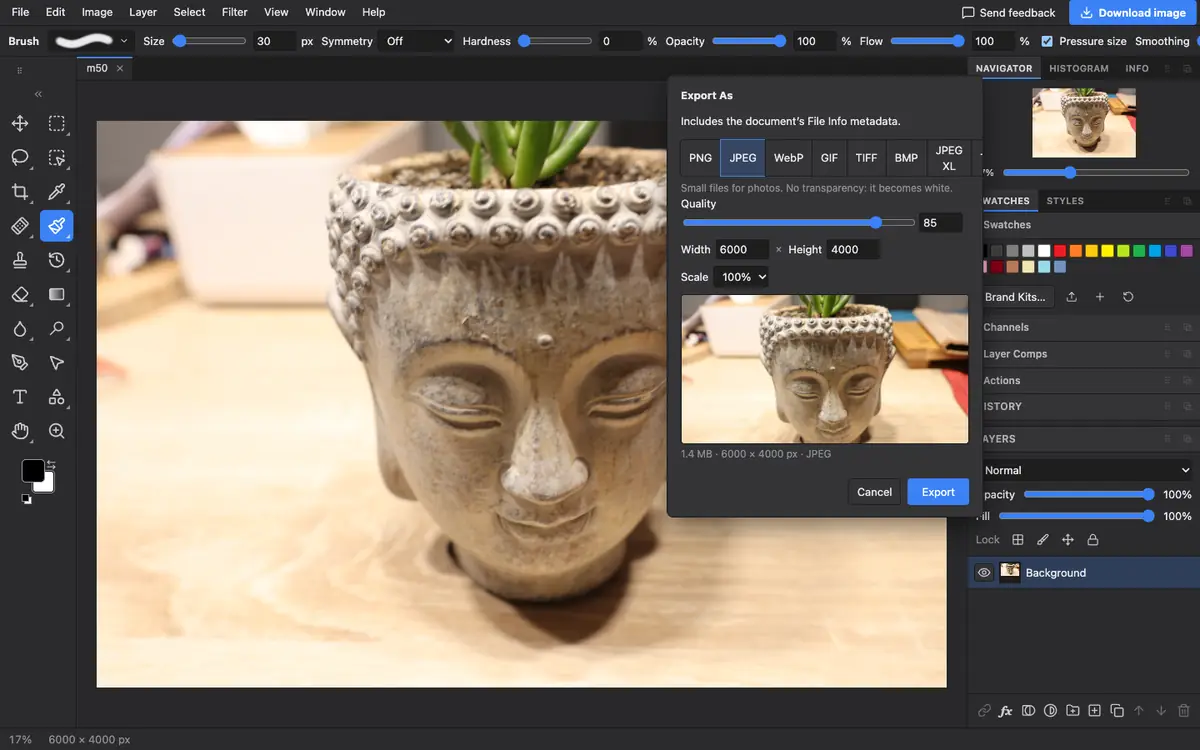
- Export as JPG. Choose File → Export As, pick JPEG, set the quality and click Export. The full resolution is kept unless you change it.
- Do many at once. Use File → Automate → Batch to save a whole set of RAW files as JPGs.
What is supported
What works
- Canon CR3 and CR2, Nikon NEF and NRW, Sony ARW and SR2, Pentax PEF, Olympus ORF, Panasonic RW2, Fujifilm RAF and DNG
- Full sensor resolution
- Saving JPEG, PNG, 16-bit TIFF or 16-bit PNG
Limits
- Support varies by camera and compression; one older Canon file we tried did not open, and Photostar says when that happens
- Photostar cannot save back to RAW
- Developing is slower in a browser than in desktop RAW software, especially on phones
Questions
How do I convert CR3 to JPG?
Open the CR3 in Photostar, choose File → Export As, pick JPEG and click Export. A Canon EOS M50 file gave a full 6000 × 4000 JPEG in our test.
Can I edit RAW photos online for free?
Yes. Photostar opens RAW files for free in your browser and has a Camera Raw Filter for exposure, colour and detail.
Are my RAW files uploaded?
No. The RAW decoder runs inside your browser, so the files stay on your computer.
Why does my RAW file not open?
Some cameras use variants the decoder does not read yet. Try the DNG Converter from your camera maker, or send us the camera model through Send feedback.
Related
Reviewed , with a real file of this kind in the current editor.