

Compress a JPEG to a smaller file size
Upload forms often cap photos at a size such as 200 KB or 1 MB. Photostar shows the exact size of the file it will save while you change the quality and dimensions, so you can get under a limit without guessing.
Photostar is a free online Photoshop alternative that runs in your browser. There is no account to make, and your files stay on your device.
Choose a photo to compressOpens the free editor. Nothing is uploaded.How to do it
- Open the photo. Use the button above, or drop the image onto Photostar. PNG, HEIC and other formats work too.
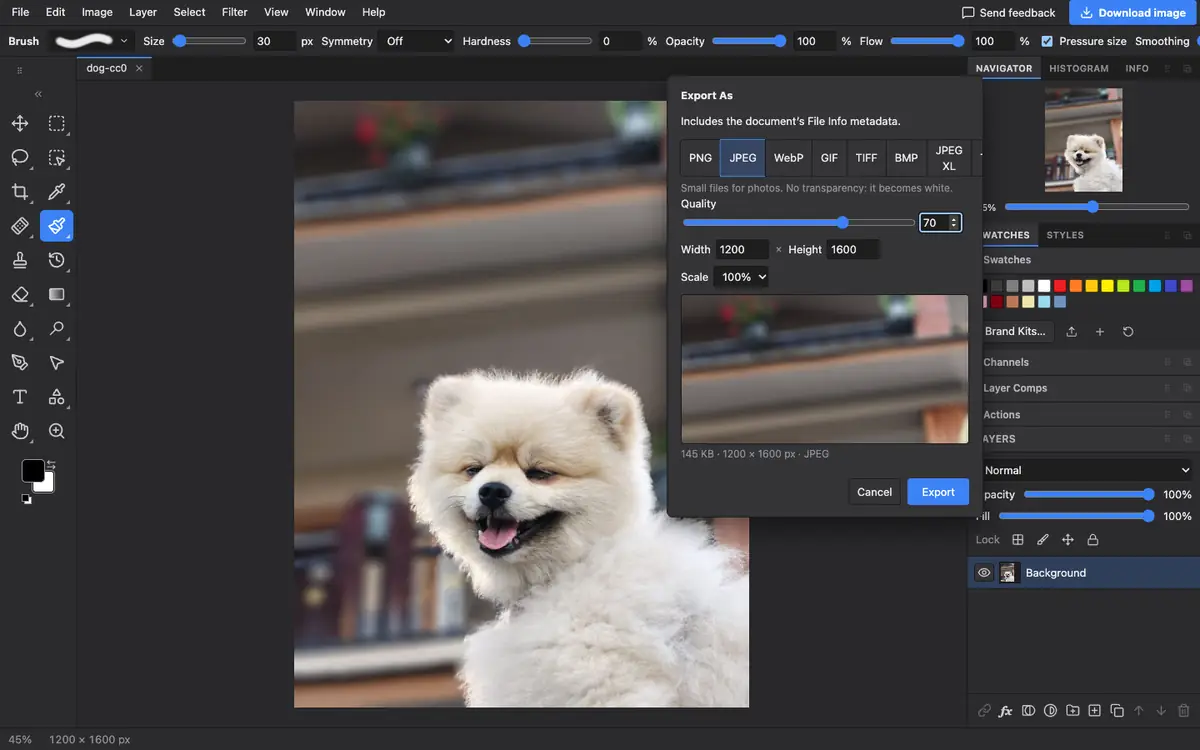
- Open Export As. Choose File → Export As and click JPEG.
- Lower the quality. Move the Quality slider. The size under the preview updates each time; 70 to 85 keeps photos looking good.
- Shrink it if needed. If the file is still too big, type a smaller width or pick a scale such as 50%. Size drops quickly with fewer pixels.
- Export. When the size is under your limit, click Export.
Hitting a target size
There is no box to type a target size; you adjust and watch. In our test a 1200 × 1600 photo came to 145 KB at quality 70 and 121 KB at quality 60. If quality has to go below about 50 to fit, reduce the width instead: halving the width roughly quarters the file. WebP and AVIF in the same dialog usually give smaller files at the same quality, if the place you upload to accepts them.
Questions
How do I compress a JPEG to 200 KB?
Open it in Photostar, choose File → Export As, pick JPEG and lower the Quality until the size shown is under 200 KB. Reduce the width if needed.
Does compressing a JPEG reduce quality?
Yes, a little. Quality between 70 and 85 is hard to tell from the original on screen. Lower than that shows blocky artefacts.
Why not just resize the photo?
Resizing also works and often helps more. A phone photo is usually far bigger than a website needs.
Is my photo uploaded to compress it?
No. The JPEG is made in your browser on your device.
Related
Reviewed , with a real photo in the current editor.