

Convert AVIF to JPG or PNG
AVIF images are small and sharp, but older programs, some upload forms and many print shops still refuse them. Photostar opens an AVIF in your browser and saves it as JPG or PNG, showing the exact file size before you download.
Photostar is a free online Photoshop alternative that runs in your browser. There is no account to make, and your files stay on your device.
Open an AVIF imageOpens the free editor. Nothing is uploaded.How to do it
- Open the AVIF. Use the button above, or drop the .avif file onto Photostar.
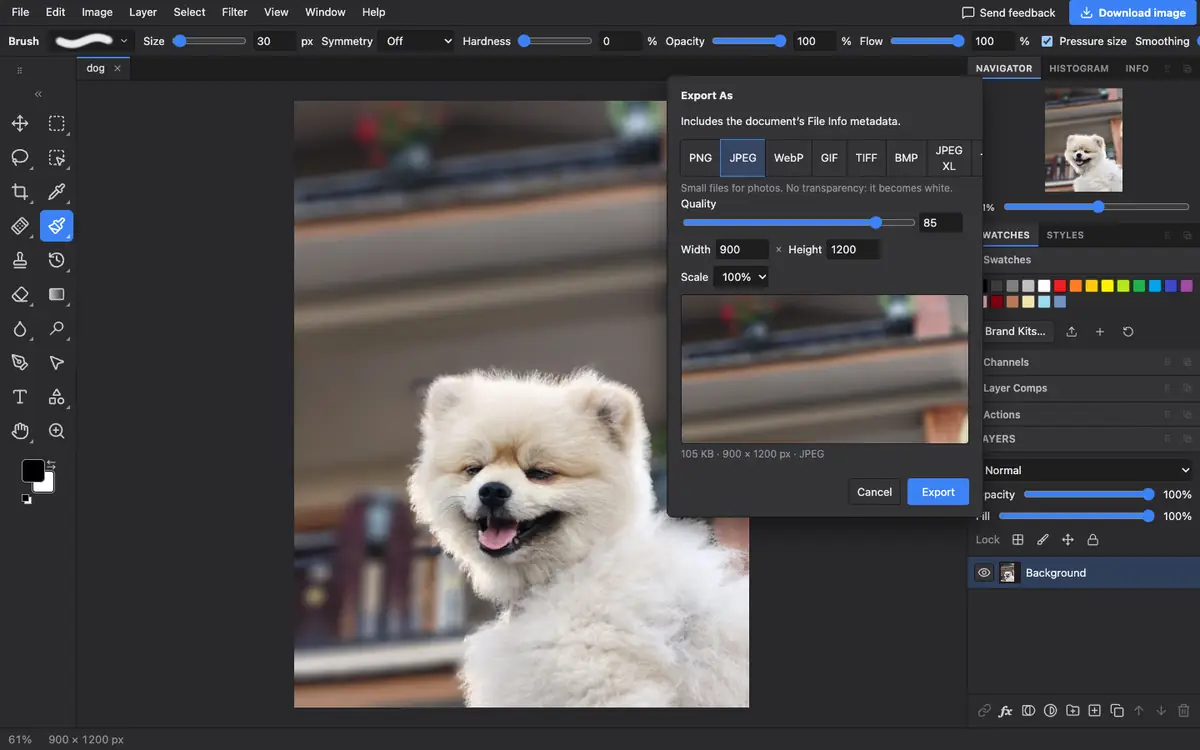
- Choose Export As. Open File → Export As. You can also use the blue Download image button for a quick JPEG or PNG.
- Pick JPG or PNG. Choose JPEG for photos. Choose PNG if the image has transparent parts, because JPEG cannot keep them.
- Check the size and export. Set the quality and, if you like, a smaller width. The size of the real file shows under the preview. Click Export.
What is supported
What works
- AVIF photos and graphics, through your browser’s own AVIF support
- Transparent AVIF images, kept when saved as PNG or WebP
- Saving back to AVIF in browsers that can encode it
Limits
- Very old browsers without AVIF support cannot open it
- JPEG has no transparency, so see-through areas become white
- Animated AVIF files open as a still picture
Questions
How do I change an AVIF to a JPG?
Open the AVIF in Photostar, choose File → Export As, pick JPEG and click Export. It takes a few seconds and the image is not uploaded.
Will converting AVIF to JPG lose quality?
A little, because JPEG is a lossy format. At quality 85 to 90 the difference is hard to see. Use PNG if you need no further loss.
Why is my JPG bigger than the AVIF?
AVIF compresses much better than JPEG, so the same picture usually takes more space as a JPG. Lower the quality or the size if you need a smaller file.
Can I convert JPG to AVIF?
Yes, in browsers that can save AVIF. Open the JPG and choose AVIF in File → Export As. If the button is greyed out, your browser cannot encode AVIF.
Related
Reviewed , with a real file of this kind in the current editor.