

Rotate or flip an image
A photo that comes out sideways, a selfie that is mirrored, a horizon that leans: each takes one menu command in Photostar.
Photostar is a free online Photoshop alternative that runs in your browser. There is no account to make, and your files stay on your device.
Choose a photo to rotateOpens the free editor. Nothing is uploaded.How to do it
- Open the photo. Use the button above or drop the photo onto Photostar.
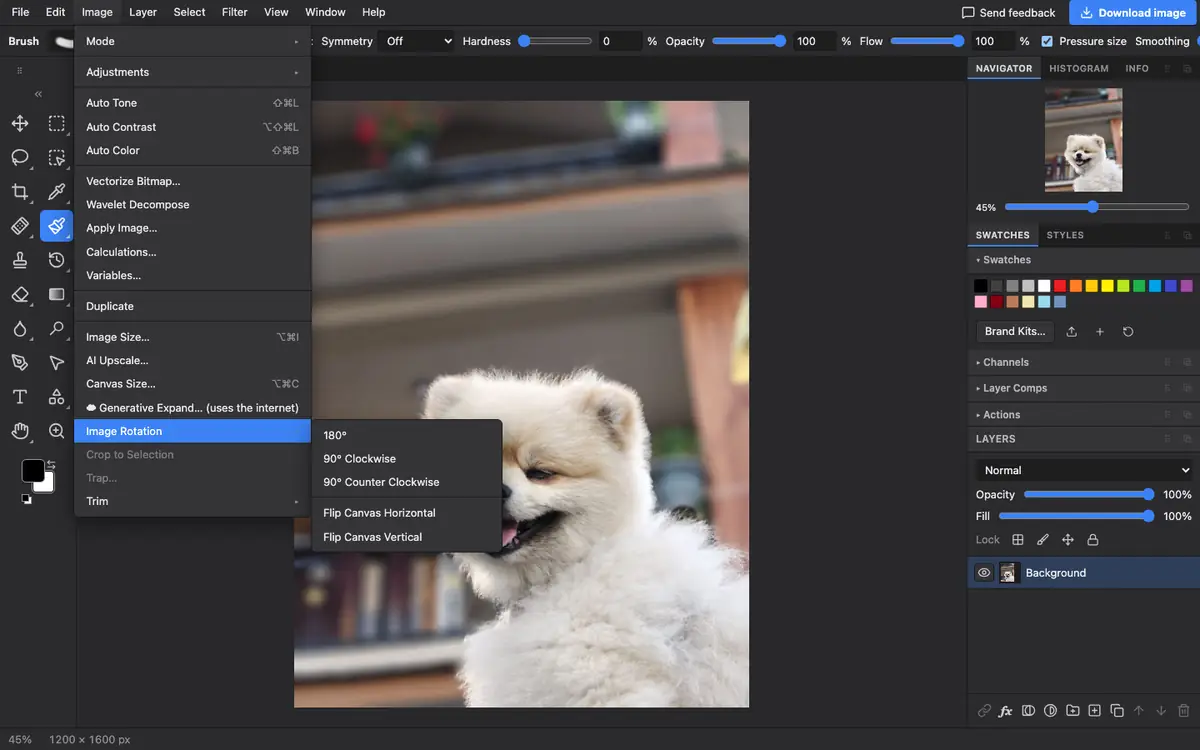
- Turn it. Choose Image → Image Rotation, then 90° Clockwise, 90° Counter Clockwise or 180°.
- Or mirror it. In the same menu, choose Flip Canvas Horizontal for a mirror image, or Flip Canvas Vertical to turn it upside down.
- Save it. Click Download image, or use File → Export As.
Rotating by any angle
To straighten a horizon by a few degrees, choose Edit → Free Transform and type the angle in the ∠ box in the bar at the top, then press Enter. Rotating leaves empty corners, so crop afterwards with the Crop tool. For scanned photos, File → Automate → Crop and Straighten Photos finds and straightens each one for you.
Questions
How do I rotate a picture 90 degrees?
Open it in Photostar and choose Image → Image Rotation → 90° Clockwise or 90° Counter Clockwise.
How do I flip a selfie so it is not mirrored?
Choose Image → Image Rotation → Flip Canvas Horizontal. Text in the photo will read the right way round again.
How do I rotate by a small angle?
Use Edit → Free Transform, type the angle in the ∠ field and press Enter, then crop away the empty corners.
Does rotating lose quality?
Quarter turns and flips do not. Rotating by other angles resamples the pixels, which softens them very slightly.
Related
Reviewed , with a real photo in the current editor.