

Crop an image online
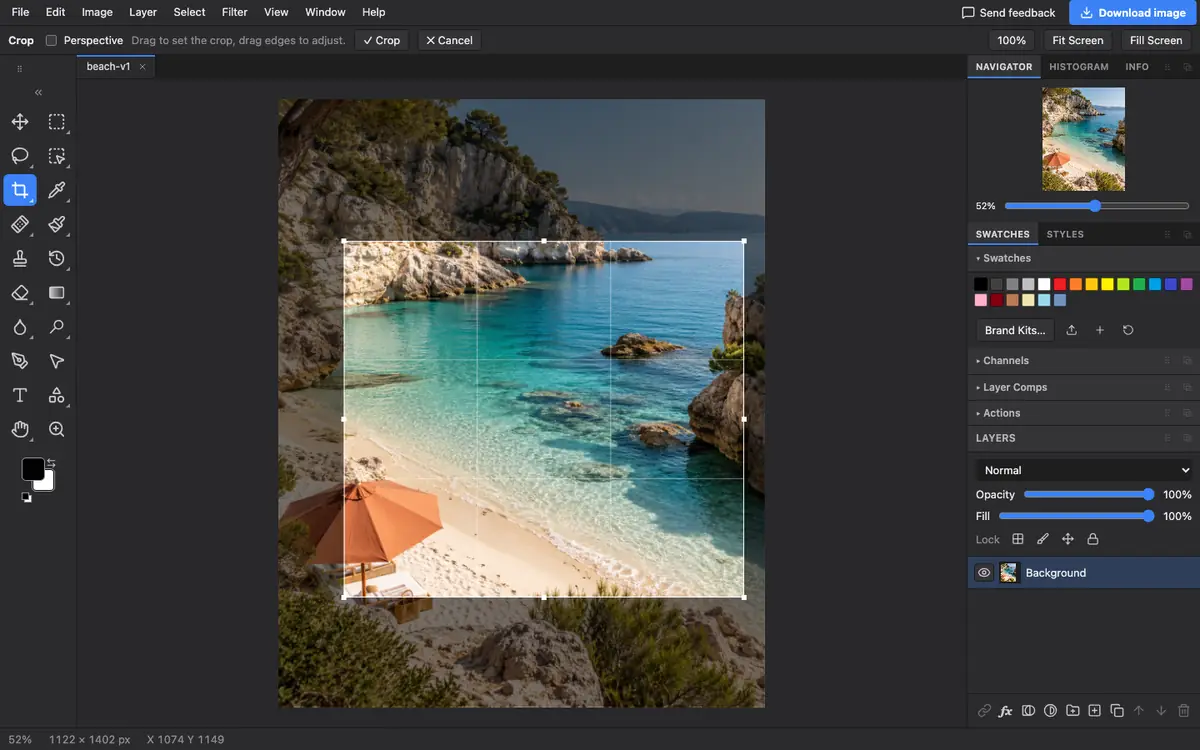
Cropping cuts away what you do not want and makes the subject stand out. In Photostar you drag a box over the photo, fine-tune the edges and press Enter.
Photostar is a free online Photoshop alternative that runs in your browser. There is no account to make, and your files stay on your device.
Choose a photo to cropOpens the free editor. Nothing is uploaded.How to do it
- Open the photo. Click the button above and pick the photo, or drop it onto Photostar.
- Pick the Crop tool. Press C, or click the crop icon in the toolbar on the left.
- Drag a box. Drag across the part you want to keep. Drag the edges or corners to adjust it; the grid helps you place the subject.
- Apply the crop. Press Enter or click Crop in the bar at the top. Press Esc to cancel.
- Save it. Click Download image, or use File → Export As to choose the format and size.
Cropping to an exact size
The Crop tool has no ratio presets. For an exact size, such as 1080 × 1080 for a post, crop roughly first, then follow resize an image to exact pixels. To square up a photo of a document or sign taken at an angle, tick Perspective in the crop bar and drag the corners onto its edges.
Questions
How do I crop a picture for free?
Open it in Photostar, press C for the Crop tool, drag a box and press Enter. Then download it. There is no account or watermark.
Can I undo a crop?
Yes. Press Ctrl+Z or Cmd+Z straight after, or use the History panel.
How do I crop a photo of a document taken at an angle?
Tick Perspective in the crop bar, drag a box, then drag its corners onto the document’s corners. Applying the crop squares it up.
Does cropping reduce quality?
No. Cropping only removes pixels. The part you keep is unchanged, though it is smaller.
Related
Reviewed , with a real photo in the current editor.