

Convert PDF pages to JPG or PNG
Sometimes you need a page of a PDF as a picture: for a slide, a social post or a form that only takes images. Photostar opens PDF pages in your browser and saves them as JPG or PNG.
Photostar is a free online Photoshop alternative that runs in your browser. There is no account to make, and your files stay on your device.
Open a PDFOpens the free editor. Nothing is uploaded.How to do it
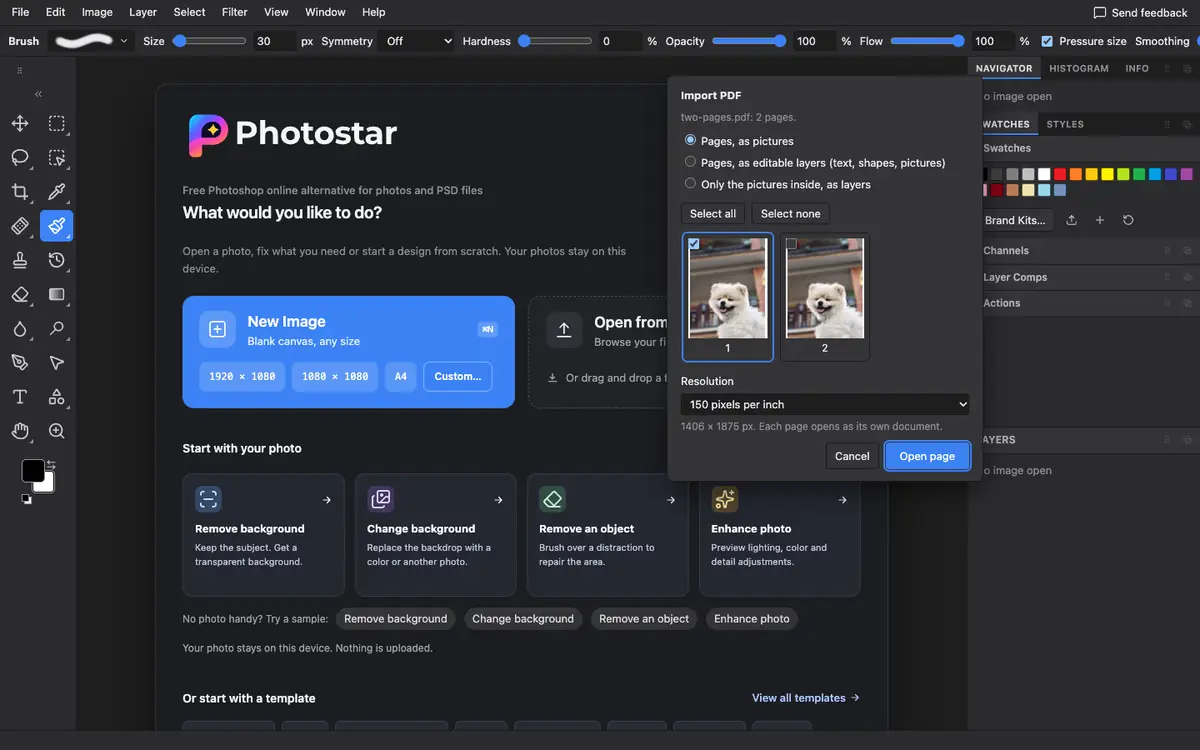
- Open the PDF. Use the button above, or drop the .pdf file onto Photostar. An Import PDF window opens.
- Pick pages and resolution. Tick the pages you want and choose 72, 150 or 300 pixels per inch. 150 suits screens; 300 suits printing.
- Choose how to open them. Pages, as pictures is the simplest. Pick editable layers if you want to change text or shapes first.
- Export each page. Each page opens in its own tab. Choose File → Export As and pick JPEG or PNG.
What is supported
What works
- Any page or set of pages
- 72, 150 or 300 pixels per inch
- Pages as pictures, as editable layers, or only the pictures inside
- Adobe Illustrator .ai files with a PDF-compatible copy inside
Limits
- Each page becomes a separate image; there is no single long image of all pages
- Password-protected PDFs need the password
- Editable-layer mode is approximate for complex layouts
Questions
How do I convert a PDF to JPG?
Open the PDF in Photostar, pick the pages and a resolution, then use File → Export As and choose JPEG for each page.
What resolution should I choose?
Use 150 pixels per inch for screens and 300 for print. An A4 page at 150 is about 1240 × 1754 pixels.
Can I get just the pictures out of a PDF?
Yes. Choose Only the pictures inside, as layers, and each embedded picture opens as its own layer.
Is my PDF uploaded?
No. Photostar reads the PDF in your browser on your device.
Related
Reviewed , with a real file of this kind in the current editor.