

Blur the background of a photo
A blurred background makes the subject stand out, the way a portrait lens does. Photostar separates the subject from the background in your browser and softly blurs what is behind it.
Photostar is a free online Photoshop alternative that runs in your browser. There is no account to make, and your files stay on your device.
Choose a photoOpens the free editor. Nothing is uploaded.How to do it
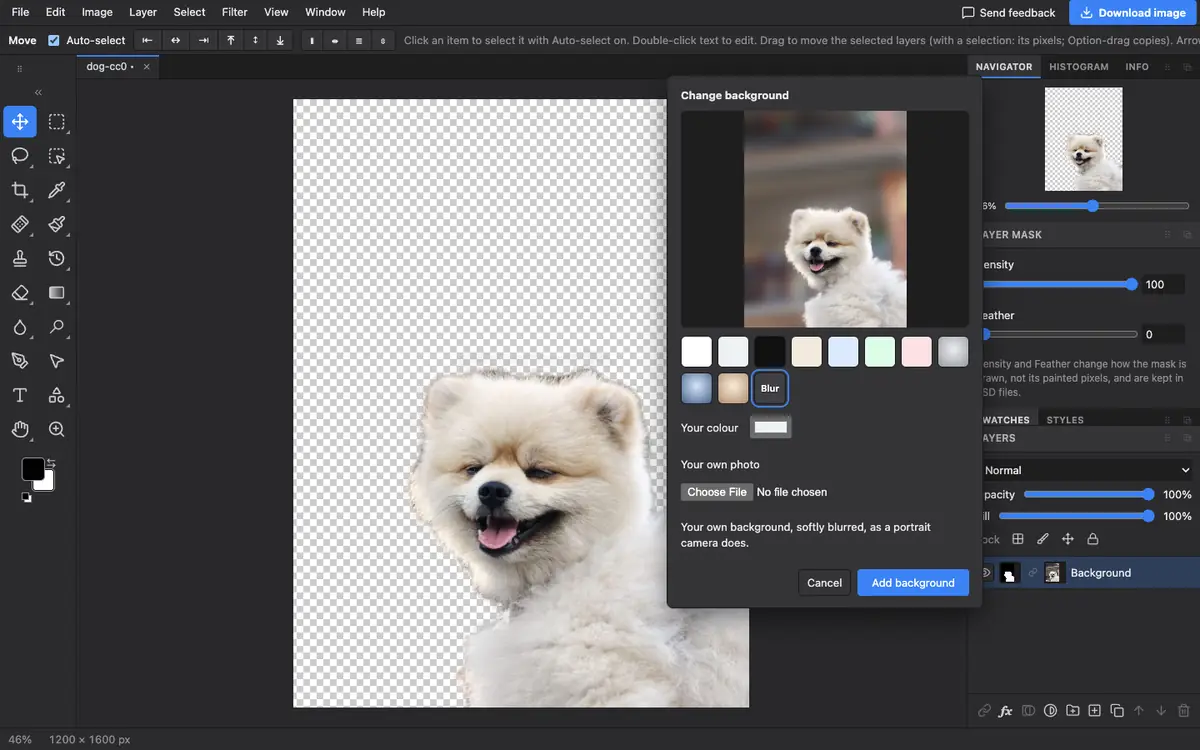
- Start Change background. Click the button above, then the highlighted Change background card on the start screen.
- Pick your photo. Choose the photo. The subject is found and cut out on your device.
- Choose Blur. Click the Blur swatch. The preview shows your own background, blurred.
- Add it and save. Click Add background, then Download image.
More control over the blur
For a stronger or graded blur, open the photo normally, use Remove background, then select the original layer and apply Filter → Blur → Gaussian Blur. Filter → Blur Gallery has field, iris and tilt-shift blurs if you want the blur to fade with distance.
Questions
How do I blur the background of a picture?
Open Photostar, click Change background, choose your photo and pick Blur. Then download it.
Does this work on photos of things as well as people?
Yes. It works on people, pets and products. A clear subject with a busy background gives the best result.
Can I choose how strong the blur is?
The quick Blur choice uses one strength. For your own strength, apply Filter → Blur → Gaussian Blur to the background layer instead.
Is the photo uploaded?
No. Finding the subject and blurring happen in your browser.
Related
Reviewed , with a real photo in the current editor.